Want to create videos that go viral? This guide, “How to Use Google Trends to Discover Viral Video Topics,” unlocks the power of Google Trends, a free tool that reveals what the world is searching for. Imagine having a crystal ball for video ideas, knowing what’s trending before it explodes! We’ll explore how to find those hidden gems and turn them into engaging video content.
Google Trends isn’t just about seeing what’s popular; it’s about understanding the
-why* behind the trends. We’ll dive into the interface, learn how to navigate its features, and uncover the secrets of the “Explore” section. From identifying seasonal opportunities to analyzing regional interest, you’ll gain the knowledge to create videos that resonate with your target audience and maximize your chances of going viral.
Introduction: Unveiling the Power of Google Trends for Video Content
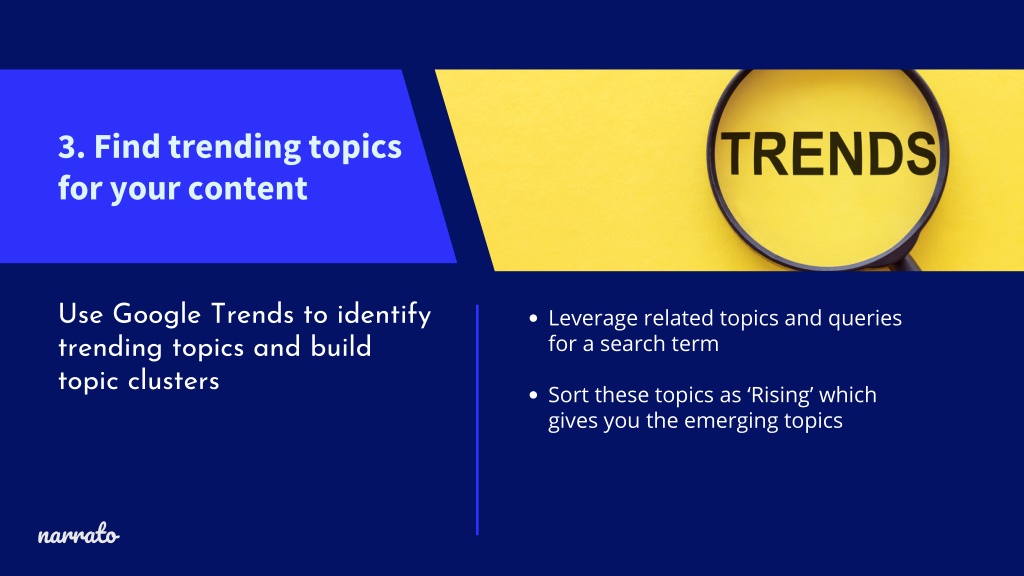
Google Trends is a powerful, free tool from Google that analyzes the popularity of search queries across various regions and languages. It offers insights into search trends, allowing you to see what people are searching for in real-time or over a specified period. This information is invaluable for content creators seeking to create engaging and relevant video content.Google Trends provides a wealth of data, enabling video creators to identify popular topics, understand seasonal search patterns, and gauge audience interest in specific subjects.
This data-driven approach helps creators make informed decisions about their video content, increasing the likelihood of attracting viewers and boosting engagement.
What Google Trends Is and Its Primary Function
Google Trends acts as a public data explorer, presenting information about search interest over time. Its primary function is to track and display the popularity of search terms. This is visualized using a relative index, where the highest point on the chart represents the peak search interest for a given term during the selected time frame and region. All other points are scaled relative to this peak.
It is important to note that the index does not represent the absolute search volume, but rather the search interest relative to the term’s highest point.
Examples of Using Google Trends to Identify Trending Topics
Google Trends can be used in numerous ways to discover trending video topics. Here are some practical examples:
- Real-time Trends: The “Trending Searches” section on the Google Trends homepage provides a snapshot of what’s currently popular. This can be a quick way to identify breaking news or viral events that might be ripe for video creation. For instance, if a major sports event is happening, videos analyzing the event, highlights, or reactions are likely to perform well.
- Research: You can use Google Trends to compare the search interest of different s related to your niche. Enter multiple s, and the tool will display their search interest over time. For example, a fitness channel could compare “yoga” versus “pilates” to see which is more popular and tailor their content accordingly.
- Seasonal Trends: Many topics experience peaks and valleys in search interest throughout the year. By analyzing historical data, you can identify seasonal trends. A cooking channel, for instance, might notice increased interest in “Thanksgiving recipes” around November. This allows them to plan and publish content well in advance of these seasonal spikes.
- Geographic Analysis: Google Trends allows you to filter by country or region, revealing regional differences in search interest. This is useful if you’re targeting a specific audience. A travel channel, for example, could identify the most searched-for destinations in a particular country and create videos focusing on those locations.
Benefits of Using Google Trends for Video Creators
Utilizing Google Trends offers several advantages for video creators aiming to increase their reach and engagement:
- Topic Discovery: Google Trends helps you uncover trending topics that are likely to attract viewers. By identifying what’s popular, you can create videos that align with current interests, increasing the chances of views and shares.
- Content Planning: The tool allows you to plan content strategically. By understanding seasonal trends and peak search times, you can schedule your videos to coincide with periods of high interest.
- Optimization: Google Trends provides valuable data for research. By identifying the most relevant and popular s, you can optimize your video titles, descriptions, and tags to improve search visibility.
- Competitive Analysis: You can use Google Trends to analyze the search interest in topics related to your competitors’ content. This can help you identify gaps in the market and create unique videos that differentiate your channel.
- Audience Understanding: By analyzing search trends, you gain insights into your audience’s interests and preferences. This information can be used to tailor your content to better meet their needs and improve engagement.
Navigating the Google Trends Interface
Now that you understand the potential of Google Trends for uncovering viral video topics, let’s dive into the platform itself. This section will guide you through the Google Trends interface, helping you understand its different components and how to use them effectively.
Accessing the Google Trends Website
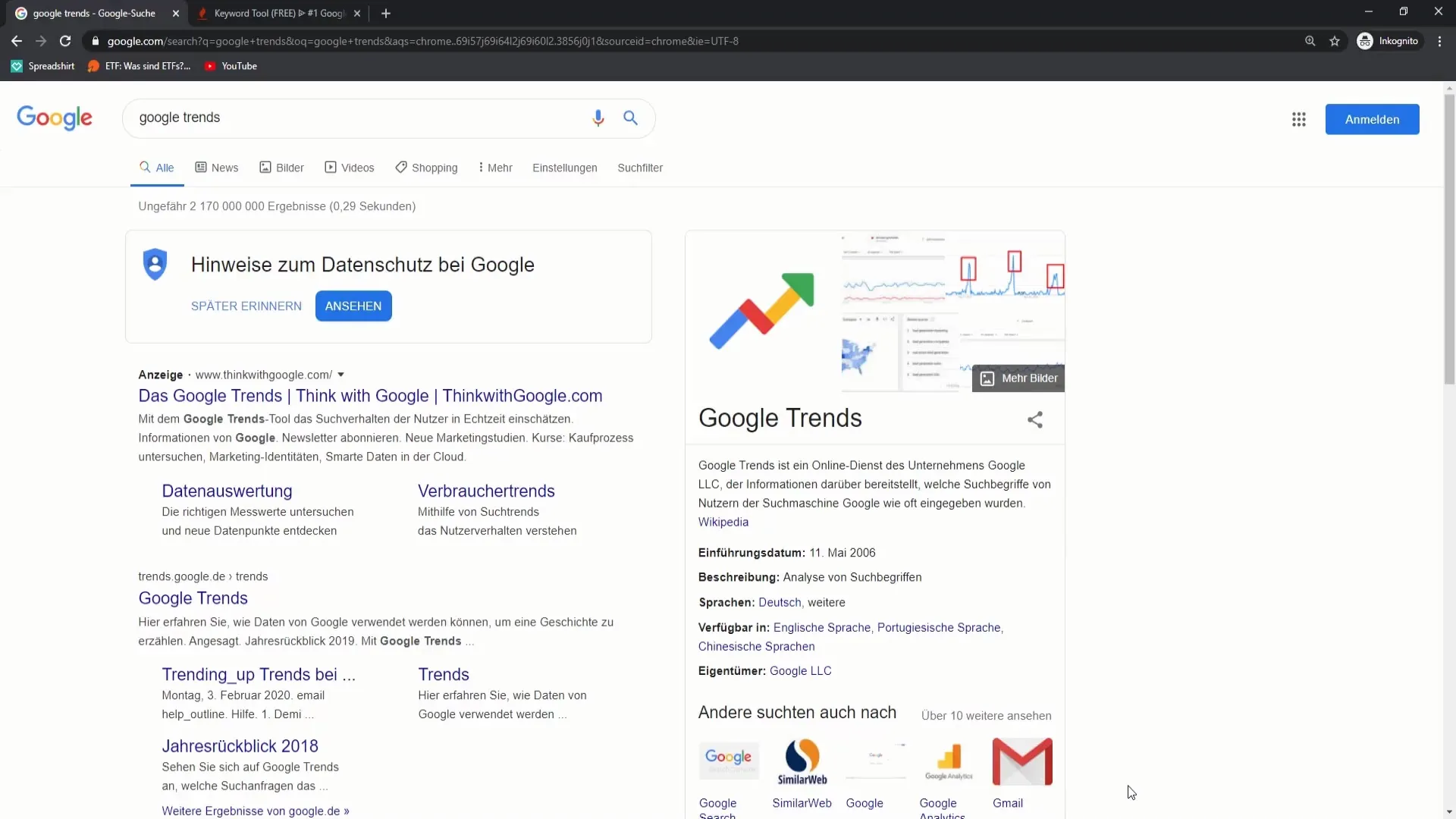
Accessing Google Trends is straightforward. You can easily reach the platform by typing “Google Trends” into any search engine like Google, Bing, or DuckDuckGo. Alternatively, you can directly access the website by typing “trends.google.com” into your web browser’s address bar. Once you’ve reached the site, you’ll be greeted by the Google Trends homepage, which provides an overview of trending searches and news.
Understanding the Google Trends Dashboard
The Google Trends dashboard is designed to be user-friendly, providing a wealth of information in an accessible format. Let’s break down the main sections and their functions.Here’s a breakdown of the key interface elements, organized in a responsive HTML table for clarity:“`html
| Section | Description | Functionality | Example |
|---|---|---|---|
| Search Bar | Located at the top of the page. | Allows you to enter search terms, topics, or s to explore their search interest over time. | Typing “cat videos” will show the search interest for that term. |
| Explore Section | The central area of the dashboard. | Provides tools to analyze search trends, compare different search terms, and filter by location, time period, and category. | You can compare “dogs” vs. “cats” to see which one has higher search interest. |
| Trending Searches | Located on the homepage. | Displays a real-time or daily list of trending searches, often including news topics and breaking events. | The “Realtime Search Trends” section shows current trending topics. |
| Menu and Settings | Typically found in the top-right corner or as a hamburger menu. | Provides access to settings, help documentation, and other Google services. | Allows you to change your account settings or access Google’s support resources. |
“`This table provides a concise overview of the Google Trends dashboard’s structure and functionality.
The “Explore” Section and Its Search Functionalities
The “Explore” section is the heart of Google Trends, where you’ll spend most of your time researching potential video topics. This section allows you to analyze search trends, compare s, and filter data to refine your search.Here are the key functionalities within the “Explore” section:
- Search Term Input: This is where you enter the s or topics you want to analyze. For example, you could type “DIY home improvement” to explore interest in that topic.
- Comparison: You can compare up to five search terms simultaneously. This feature is incredibly useful for determining which topics are more popular or have growing interest. For example, you could compare “vegan recipes” with “vegetarian recipes” to gauge relative interest.
- Location Filtering: You can specify the geographic region you want to analyze, from a global scale down to specific countries or even cities. This is crucial for understanding regional trends and tailoring your video content to specific audiences.
- Time Period Filtering: This allows you to select the time frame for your analysis, ranging from the last hour to the past five years, or even a custom date range. This is important for identifying seasonal trends or recent spikes in interest.
- Category Filtering: You can filter your search by category, such as “Arts & Entertainment,” “Health,” or “Shopping.” This helps narrow your focus and identify trends within specific niches.
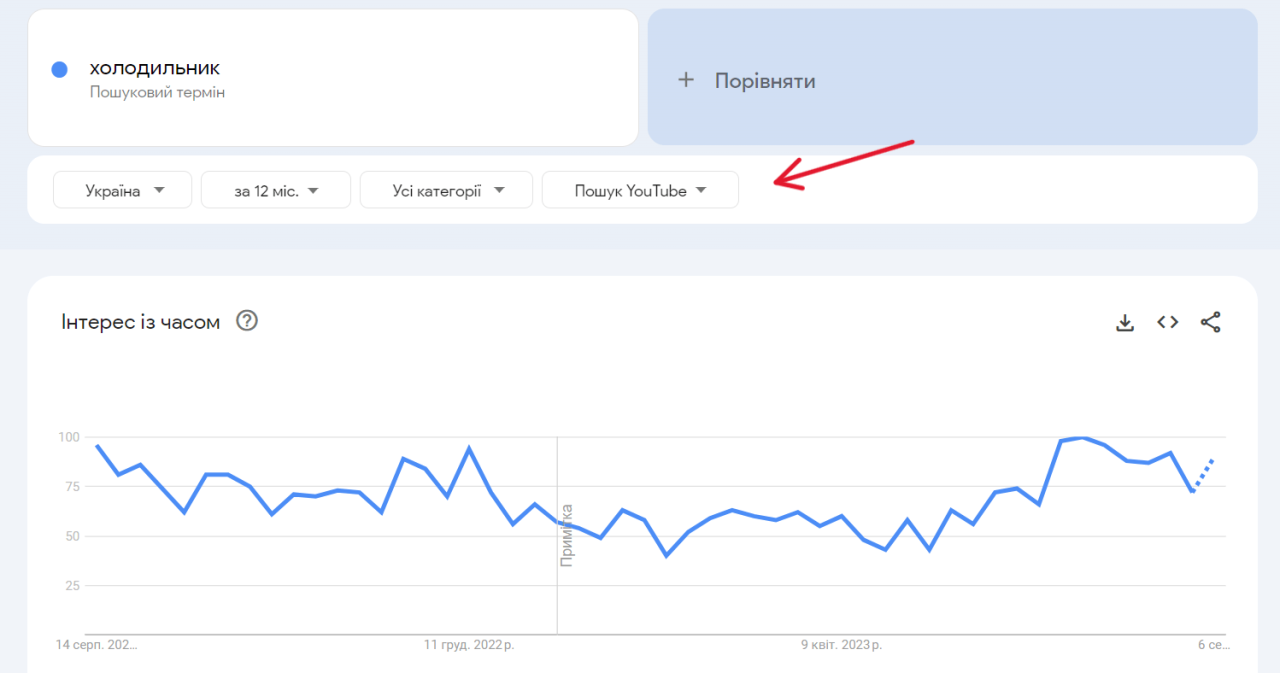
- Web Search, Image Search, News Search, Google Shopping, YouTube Search: You can filter search results by type, such as Web Search, Image Search, News Search, Google Shopping, or YouTube Search. This lets you see how a topic is trending across different platforms. For video creators, filtering by YouTube Search is particularly valuable.
Within the Explore section, you’ll also find visual representations of the data, such as line graphs showing search interest over time and maps highlighting regional interest. These visualizations make it easier to spot patterns and identify potential video topics. For instance, if you are considering creating a video on “best coffee makers,” using the time period filter to view the search interest over the past year can reveal spikes around the holiday season.The “Explore” section’s flexibility makes it a powerful tool for identifying viral video opportunities.
By understanding these features and functionalities, you can effectively navigate the Google Trends interface and begin your search for trending topics.
Identifying Trending Topics with “Explore”
Google Trends’ “Explore” section is your primary tool for uncovering hot topics ripe for video content. It allows you to dive deep into search data, revealing what people are actively searching for, which translates directly into potential video ideas. This section empowers you to make data-driven decisions, ensuring your content aligns with current interests and maximizes its chances of going viral.
Step-by-step Procedure for Searching Topics in “Explore”
The “Explore” section is user-friendly, but following a structured approach ensures you get the most out of it.
1. Enter Your Search Term
In the search bar at the top, type in a or phrase related to your niche. For instance, if you’re in the cooking niche, you might start with “vegan recipes.”
2. Refine Your Search
After entering your term, Google Trends will display a graph representing its search interest over time. Before diving into the data, consider refining your search using the options below the search bar.
3. Analyze the Data
Pay close attention to the graph. Note any significant spikes or dips in interest. These can indicate trending moments or seasonal patterns. Scroll down to see related queries and topics; this offers valuable insights into what users are
also* searching for, giving you even more content ideas.
Filtering Search Results by Country, Time Range, and Category
To gain a deeper understanding of search trends, you’ll need to filter your results. Google Trends provides several options for this.* Country: By default, Google Trends shows global data. To narrow your focus, click on the “Worldwide” option and select a specific country or a group of countries. This is crucial because trends vary significantly depending on location.
For example, a search for “Thanksgiving dinner” will show significantly higher interest in the United States compared to Japan.
Time Range
The default time range is often “past 12 months.” You can adjust this to see trends over different periods, such as the past hour, day, 7 days, 30 days, 90 days, 5 years, or even since 2004. This allows you to identify short-term spikes, long-term growth, or seasonal patterns. For example, searching for “Christmas decorations” will reveal a significant peak in December each year.
Category
You can refine your search by category to focus on specific areas. For example, if you’re searching for “sports,” you can narrow it down to “Sports News,” “Football,” or “Basketball.” This is essential because a broad term like “sports” might encompass many different sub-categories, diluting your results.
Niche Categories Suitable for Video Content Creation
Identifying a niche is crucial for success. Here are some examples of niche categories that often perform well on video platforms:* Fitness & Wellness: Exercise routines, healthy eating tips, mindfulness practices.
Gaming
Gameplay videos, walkthroughs, game reviews, esports coverage.
Beauty & Fashion
Makeup tutorials, clothing hauls, styling tips, product reviews.
Cooking & Recipes
Recipe demonstrations, food reviews, cooking challenges, meal prep.
DIY & Crafts
Craft tutorials, home improvement projects, upcycling ideas.
Travel & Vlogging
Travel vlogs, destination guides, travel tips, hotel reviews.
Technology
Product reviews, tech tutorials, software demos, gadget unboxing.
Personal Finance
Budgeting tips, investment advice, debt management strategies.
Education & Tutorials
Online courses, how-to guides, educational explainers.
Entertainment & Pop Culture
Movie reviews, music analysis, celebrity news, TV show recaps.
Comparing the Popularity of Multiple Search Terms
Comparing search terms allows you to identify which topics are more popular and thus potentially more lucrative for video creation.To compare search terms, simply enter multiple terms into the search bar, separated by commas. For example, you could search for “vegan recipes, keto recipes, paleo recipes.” Google Trends will then display a graph showing the relative popularity of each term over time.
You’ll also see the “Related queries” and “Related topics” sections updated to reflect the combined search. This comparison helps you to understand which recipes are currently most popular. You can also use this to see if the interest in one topic is cannibalizing the interest in another.
Understanding Interest Over Time and Regional Interest
Understanding “Interest Over Time” and “Regional Interest” within Google Trends provides critical insights for video creators. This data allows for informed decisions regarding topic selection, content timing, and audience targeting, ultimately enhancing the chances of a video going viral. Let’s delve into how to effectively leverage these features.
Interpreting “Interest Over Time”
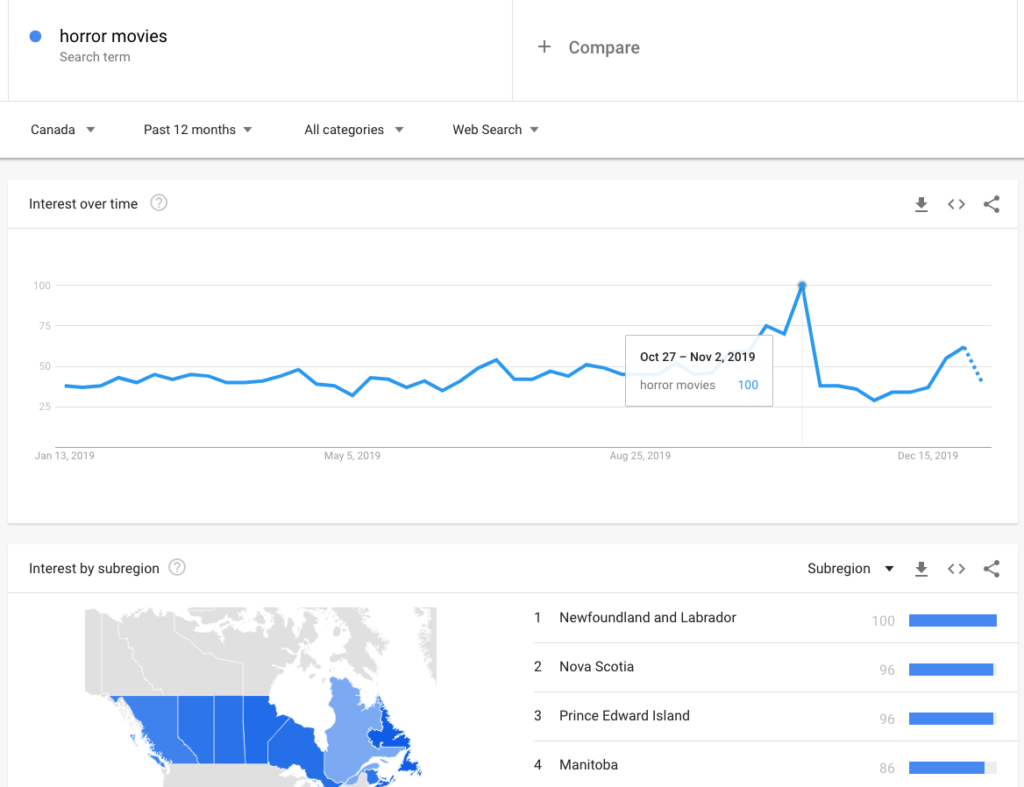
The “Interest Over Time” graph is a powerful tool for understanding the popularity of a search term over a specific period. This graph visualizes search interest relative to the highest point on the chart for the selected region and time. A value of 100 represents the peak popularity, while a value of 50 indicates that the term’s popularity is half as high.
Understanding how to interpret this graph is crucial for predicting trends and making data-driven content decisions.To effectively analyze the “Interest Over Time” graph, consider the following:
- Identifying Seasonal Trends: Some topics experience predictable spikes in interest at certain times of the year. For example, searches related to “Halloween costumes” typically peak in October. Recognizing these seasonal patterns allows you to create and publish videos strategically to capitalize on peak interest.
- Spotting Emerging Trends: Look for terms showing a consistent upward trend. This indicates growing popularity and potential for viral content. Identifying these early trends gives you a first-mover advantage.
- Analyzing Declining Trends: A downward trend suggests a topic is losing popularity. While you might still create content on these topics, understand that the audience might be smaller, or the content might require a unique angle to capture attention.
- Recognizing Stable Trends: Terms with a relatively flat “Interest Over Time” graph suggest consistent, ongoing interest. These topics can provide a steady stream of views, but may not be as likely to go viral as trending topics.
For instance, imagine searching for “vegan recipes” on Google Trends. You might observe a steady increase in interest over the past five years, with peaks during January (likely due to New Year’s resolutions) and dips in summer. This suggests a growing, year-round audience with seasonal fluctuations.Here is a visual representation of a hypothetical trend:
Hypothetical Trend: “DIY Home Decor”
The graph illustrates the “Interest Over Time” for the search term “DIY Home Decor” over a 12-month period.
- X-axis (Horizontal): Represents the months, starting with January and ending with December.
- Y-axis (Vertical): Represents the relative search interest, ranging from 0 to 100. The value 100 represents peak popularity.
- Trend Line: The line starts at a value of 30 in January, steadily increases to 60 by March. It then plateaus slightly during the summer months (June, July, August), hovering around 65. The interest then increases again in September to reach 80. Finally, the line shows a sharp peak in October at 100 (likely due to fall decorating) before gradually declining to 50 by December.
This visualization demonstrates a clear seasonal trend, with a peak in the fall. A video creator could use this information to plan their “DIY Home Decor” content, focusing on fall-themed videos for maximum impact.
Understanding “Regional Interest”
The “Regional Interest” map within Google Trends provides a geographical breakdown of search interest for a given term. This feature is invaluable for video localization, helping you tailor your content to specific audiences and optimize your video’s reach.Here’s how to utilize the “Regional Interest” map:
- Identifying High-Interest Regions: The map highlights regions where the search term is most popular. This information is critical for targeting your video’s promotion and language selection. If a term is highly popular in France, for example, consider translating your video into French or creating French-specific content.
- Understanding Cultural Nuances: Regional interest can reveal cultural differences that influence content preferences. For example, a cooking video about “Thanksgiving dinner” might perform well in the United States but less so in other countries. Understanding these nuances allows you to adapt your content accordingly.
- Optimizing Video Descriptions and Tags: Use the “Regional Interest” data to inform your video’s description and tags. Include relevant s and phrases that are popular in the regions where your target audience resides.
- Planning Targeted Advertising: Utilize the regional data to focus your video advertising campaigns on the areas with the highest interest. This targeted approach increases the likelihood of reaching your desired audience.
For example, imagine you are analyzing the term “soccer.” The “Regional Interest” map might show high interest in Brazil, Argentina, and Spain. This information suggests that creating videos in Spanish and Portuguese, or focusing on topics relevant to those countries’ soccer cultures, could significantly boost your video’s visibility and engagement.
Using Google Trends for Seasonal Content
Leveraging Google Trends effectively extends beyond identifying immediate trending topics; it also empowers you to anticipate and capitalize on seasonal content opportunities. Understanding seasonal trends allows you to create video content that resonates with audiences during specific times of the year, maximizing views and engagement. This proactive approach ensures your content remains relevant and timely.
Identifying Seasonal Trends
Google Trends offers robust tools for pinpointing seasonal content opportunities. By analyzing search interest over time, you can identify peaks and valleys in search queries, revealing when certain topics gain traction.To identify seasonal trends:
- Use the “Explore” feature: Enter a broad related to a potential seasonal topic (e.g., “Halloween,” “Back to School,” “Summer Recipes”).
- Set the time range: Choose “Past 5 years” or “Past 12 months” to visualize the trend over a longer period. This helps distinguish genuine seasonal patterns from one-off spikes.
- Analyze the graph: Look for recurring peaks and troughs in the search interest. These patterns indicate seasonal trends. For instance, searches related to “Christmas decorations” typically peak in December.
- Compare multiple s: Compare related s (e.g., “Thanksgiving recipes” vs. “Christmas recipes”) to gain a more comprehensive understanding of seasonal interest and identify potential content gaps.
- Use the “Related queries” and “Related topics” sections: Explore these sections to discover niche topics and s related to your main search term. This can uncover hidden seasonal opportunities.
Examples of Seasonal Topics Suitable for Video Content
Numerous seasonal topics lend themselves perfectly to video content. By tapping into these trends, you can create engaging videos that capture audience interest.Examples of seasonal video topics include:
- Holidays: Christmas (gift guides, decorating tutorials, festive recipes), Halloween (costume ideas, haunted house reviews, spooky makeup tutorials), Thanksgiving (cooking tips, table setting ideas, family activities).
- Seasonal Events: Summer vacations (travel guides, packing tips, outdoor activities), Back to School (school supply hauls, study tips, fashion ideas), Spring Cleaning (decluttering tips, organization hacks, cleaning product reviews).
- Seasonal Products: Pumpkin spice recipes, winter fashion trends, summer beauty tips, gardening tutorials.
- Sports Seasons: Football season (game day recipes, team analysis, fantasy football tips), Baseball season (player profiles, stadium reviews, game highlights).
Planning Video Content Around Specific Events or Holidays
Strategic planning is crucial for maximizing the impact of seasonal video content. This involves determining when to publish your videos to align with audience search behavior.To plan video content around specific events or holidays:
- Research the lead time: Determine when people start searching for related topics. For example, searches for “Halloween costumes” often begin in late summer.
- Create a content calendar: Plan the topics and publishing dates for your videos well in advance. This ensures you can produce high-quality content and optimize it for search.
- Optimize for search: Use relevant s in your video titles, descriptions, and tags. Incorporate seasonal s to improve your video’s visibility.
- Promote your videos: Share your videos on social media platforms and other channels to reach a wider audience.
- Analyze performance: Monitor your video’s performance using YouTube Analytics or other analytics tools to track views, engagement, and watch time. Use these insights to refine your content strategy for future seasonal campaigns.
Creating a Schedule for Publishing Seasonal Videos
Creating a structured schedule for publishing seasonal videos is crucial for capturing audience interest at the right time. This proactive approach maximizes the impact of your content.Consider the following hypothetical example for a “Back to School” campaign:
| Date | Video Topic | Description |
|---|---|---|
| July 15 | “Back to School Shopping Haul” | Showcase essential school supplies and popular trends. |
| July 29 | “DIY School Supplies” | Offer tutorials on creating personalized school supplies. |
| August 5 | “Back to School Outfit Ideas” | Provide style tips and fashion inspiration for the new school year. |
| August 12 | “Study Tips and Tricks” | Share effective study techniques and organizational strategies. |
| August 19 | “Back to School Tech Guide” | Review and recommend tech gadgets for students. |
This schedule allows you to release videos at intervals leading up to the start of the school year, capturing different aspects of the “Back to School” season. Remember to adjust the schedule based on the specific season and your target audience’s search patterns. This type of proactive planning, combined with optimization and promotion, significantly enhances the visibility and success of your seasonal video content.
Combining Google Trends with Other Research Methods

Integrating Google Trends with other research methods significantly amplifies your ability to identify and validate winning video topics. By cross-referencing data from various sources, you gain a more comprehensive understanding of audience interests, search trends, and the competitive landscape. This holistic approach reduces the risk of creating content that fails to resonate with your target audience.
Integrating Google Trends with Social Media Monitoring
Social media monitoring provides real-time insights into conversations, hashtags, and emerging trends that complement Google Trends data. By combining these methods, you can pinpoint topics that are both trending in search and generating buzz on social platforms.
- Identifying Trending Topics: Use social media monitoring tools (e.g., Hootsuite, Brandwatch, or Sprout Social) to identify trending hashtags and s related to your niche. Then, input these terms into Google Trends to assess their search volume and interest over time. If a social media trend has a corresponding spike in Google Trends, it signals strong potential for a successful video.
- Understanding Audience Sentiment: Social media monitoring allows you to gauge audience sentiment towards a particular topic. Analyze the tone and language used in social media posts to understand how people feel about a subject. This sentiment analysis can inform your video’s messaging and approach.
- Analyzing Competitor Activity: Monitor your competitors’ social media activity to identify the topics they are covering and how their audience responds. Use Google Trends to assess the search volume of those topics and identify potential gaps or opportunities.
- Example: Suppose a new skincare product is heavily promoted on Instagram with a specific hashtag. Simultaneously, you notice a surge in Google searches related to “best skincare for sensitive skin.” You could then create a video reviewing the product, using the trending hashtag, and incorporating search-optimized s.
Using Google Trends Data with Audience Insights
Audience insights provide valuable demographic, psychographic, and behavioral data that helps you tailor your video content to your target audience. Combining these insights with Google Trends allows you to create highly relevant and engaging videos.
- Understanding Audience Demographics: Audience insights (from tools like Google Analytics or Facebook Audience Insights) reveal your audience’s age, location, gender, and interests. Use this information to filter Google Trends data by location and refine your topic selection based on regional interests.
- Analyzing Audience Behavior: Audience insights can show you what content your audience is already consuming. Compare these insights with Google Trends data to identify topics that align with their interests and preferences, but are also trending in search.
- Identifying Content Gaps: Audience insights can also highlight areas where your audience has unmet needs or interests. Use Google Trends to explore topics related to those needs and create videos that fill the content gap.
- Example: If your audience insights reveal that your viewers are primarily located in the UK and are interested in vegan recipes, you can use Google Trends to search for “vegan recipes UK” or related terms. Analyze the interest over time to identify trending recipes or ingredients that resonate with your target demographic.
Demonstrating the Process of Cross-Referencing Information from Different Sources
Cross-referencing involves comparing and contrasting data from multiple sources to validate your video topic ideas and gain a more comprehensive understanding of the market. This process ensures your video topics are supported by robust data.
- Step 1: Identify Initial Topic Ideas: Start by brainstorming potential video topics related to your niche.
- Step 2: Use Google Trends for Initial Validation: Input your topic ideas into Google Trends to check their search volume and interest over time. Look for topics with consistent or increasing search interest.
- Step 3: Analyze Social Media Activity: Search for relevant hashtags and s on social media platforms to gauge audience engagement and identify trending conversations.
- Step 4: Gather Audience Insights: Use audience insights from analytics platforms to understand your target audience’s demographics, interests, and behaviors.
- Step 5: Cross-Reference Data: Compare the data from Google Trends, social media, and audience insights. Look for topics that show strong search interest, high social media engagement, and alignment with your audience’s preferences.
- Step 6: Refine and Prioritize Topics: Based on the cross-referenced data, refine your topic ideas and prioritize those that show the greatest potential for success.
- Example: Let’s say you’re a travel vlogger. You’re considering a video on “best destinations for solo female travelers.”
- Google Trends: Shows a steady increase in searches for “solo female travel” over the past year, with spikes around holidays.
- Social Media: Numerous Instagram posts with the hashtag #solofemaletravel, showing high engagement and positive sentiment.
- Audience Insights: Your audience is primarily composed of women aged 25-45, interested in adventure travel and cultural experiences.
Based on this cross-referencing, the topic “best destinations for solo female travelers” appears to be a strong candidate for a video, as it aligns with search trends, social media buzz, and your audience’s interests.
Avoiding Common Pitfalls
It’s easy to get swept up in the excitement of finding viral video topics. However, using Google Trends effectively means avoiding common mistakes that can derail your efforts. This section highlights the pitfalls to watch out for, ensuring you use Google Trends strategically and sustainably.
Chasing Fleeting Trends
One of the biggest mistakes is focusing solely on trends that have a very short lifespan. While these topics might offer a burst of views, they often lead to content that quickly becomes irrelevant. This is especially true for videos.Consider these points:
- Short-Term Popularity: Fleeting trends often peak quickly and then decline just as rapidly. By the time your video is created, edited, and published, the trend might already be over.
- Lack of Long-Term Value: Videos based on short-lived trends may generate initial views but have little to no long-term impact on your channel’s growth or audience engagement.
- Risk of Misleading Data: A sudden spike in Google Trends data can be tempting, but it’s crucial to analyze the trend’s sustainability before committing to a video.
For example, imagine a viral dance challenge that lasts only a few weeks. Creating a video tutorial or response video to this challenge might generate some initial views. However, once the challenge fades, the video’s relevance and views will plummet. In contrast, a tutorial on a more evergreen topic, like how to edit videos, will continue to attract views over time.
Prioritizing Evergreen Content
Evergreen content, on the other hand, offers lasting value. This type of content remains relevant for a long time, consistently attracting views and helping to build a loyal audience. This approach is crucial for long-term channel success.Here’s why evergreen content is valuable:
- Consistent Views: Evergreen videos provide a steady stream of views over months and even years.
- Builds Authority: By focusing on timeless topics, you establish yourself as a reliable source of information.
- Long-Term Benefits: Evergreen content tends to rank well in search results over time, driving organic traffic to your channel.
An example of evergreen content is a tutorial on how to use a specific software program. Such videos remain relevant as long as the software is used, attracting viewers searching for solutions to their problems. Another example is a video explaining the basics of a specific skill, like photography or coding. This content will remain relevant as long as people want to learn those skills.
Evaluating Trend Sustainability
Before creating a video based on a trend, carefully evaluate its potential longevity. This involves more than just looking at the current popularity graph. Consider these factors:
- Trend Duration: Analyze how long the trend has been active and its historical performance. Look for trends with a sustained upward trajectory or consistent interest over a period.
- Search Volume Stability: Check for consistent search volume, avoiding sharp peaks and valleys that indicate volatility.
- Underlying Interest: Determine if the trend is driven by genuine interest or external factors like marketing campaigns or news events.
- Related Topics: Explore related topics to identify potential spin-off videos or content that can extend the trend’s relevance.
For instance, if you’re considering a video about a new technology, research its projected lifespan and the broader interest in similar technologies. If the technology has strong industry backing, sustained media coverage, and a clear path for future development, it’s more likely to be a sustainable trend. However, if the technology is a novelty with limited long-term potential, the video might not be a good investment.
Examining related topics in Google Trends can help to understand the context and potential for future content.
Real-World Examples: Case Studies
Understanding how successful video creators leverage Google Trends is crucial for maximizing your own video content’s impact. These real-world examples showcase how strategic use of Google Trends data can lead to viral success, illustrating the practical application of the techniques we’ve discussed. We’ll examine specific instances where Google Trends played a pivotal role in identifying trending topics and informing the video creation process.
Case Study 1: The “Squid Game” Craze
The global phenomenon of “Squid Game” offers a compelling example of how timely content creation, driven by Google Trends insights, can lead to massive viewership. This case study analyzes how creators capitalized on the burgeoning interest in the show.The rise of “Squid Game” demonstrated the power of identifying and acting upon emerging trends. Several video creators successfully leveraged the increasing search interest to create relevant content.
Here’s a breakdown of the steps involved:
- Monitoring the Trends: Creators closely monitored Google Trends for search terms related to “Squid Game” such as “Squid Game trailer,” “Squid Game review,” and “Squid Game behind the scenes.” This revealed the rapid growth in interest as the show gained popularity.
- Identifying Content Gaps: Analysis of the search queries revealed what viewers were looking for. This included specific questions about the plot, character analyses, and behind-the-scenes information.
- Content Creation: Creators rapidly produced videos addressing these identified needs. This involved creating reviews, recaps, analyses of the games, and discussions of the show’s themes.
- Optimization: Videos were optimized with relevant s derived from Google Trends data in titles, descriptions, and tags. For example, a video analyzing a specific game in “Squid Game” would include terms like “red light green light Squid Game” and “Squid Game strategy.”
- Timing: The speed of content creation was critical. Videos were published as quickly as possible to capitalize on the peak interest in “Squid Game” before the trend subsided.
Case Study 2: Recipe Videos and Seasonal Trends
Food-related content thrives on seasonal trends, and Google Trends is an invaluable tool for identifying those opportunities. This case study demonstrates how a food blogger used Google Trends to create a viral recipe video during a specific holiday.The following illustrates how the blogger utilized Google Trends:
- Trend Identification: The blogger used Google Trends to analyze search interest around Thanksgiving recipes. They entered s like “Thanksgiving recipes,” “Thanksgiving dessert,” and specific dish names like “pumpkin pie” and “turkey recipes.”
- Seasonal Timing: They identified the peak search interest for Thanksgiving recipes, which typically begins several weeks before the holiday.
- Recipe Selection: They chose a relatively unique and popular recipe based on search volume. For example, if “pumpkin pie” had high search interest, they might have selected a less common variant, like “pumpkin pie with salted caramel.”
- Video Production: They created a visually appealing video showcasing the recipe, focusing on clear instructions and enticing visuals.
- Optimization: The video title, description, and tags were optimized with s from Google Trends. For example, the title might have been “Easy Pumpkin Pie Recipe for Thanksgiving!”
- Promotion: The video was promoted on social media platforms, targeting audiences interested in food, cooking, and Thanksgiving.
Case Study 3: The “Challenge” Video Craze
Challenges, particularly those that involve interaction, often generate significant online buzz. Google Trends helped creators identify and capitalize on these trends.This is an example of how the creators used Google Trends to make a successful challenge video:
- Identifying Emerging Trends: Creators used Google Trends to identify rising challenge trends. They searched for s like “challenge,” “new challenge,” and specific challenge names.
- Analyzing Engagement: The creators looked for challenges with high search interest and potential for audience participation.
- Content Creation: They created a video based on the selected challenge, ensuring it was engaging and easy to replicate. This involved clear instructions, enthusiastic presentation, and audience interaction.
- Promotion: The video was promoted across various social media platforms, encouraging viewers to participate and share their own attempts.
- Hashtag Strategy: A dedicated hashtag was created and promoted alongside the video to track participation and encourage engagement.
Staying Updated with Trends
Keeping your finger on the pulse of online trends is crucial for consistent video content creation. Google Trends is a dynamic tool, and to truly harness its power, you need to monitor it regularly and proactively. This section will guide you on how to stay informed about emerging trends, set up helpful alerts, and leverage resources to ensure your content remains relevant and engaging.
Monitoring Google Trends Regularly
Consistent monitoring of Google Trends is essential for identifying opportunities. This involves a routine approach to reviewing the platform and analyzing data.To effectively monitor Google Trends:
- Establish a Routine: Dedicate specific times each week or even daily to check Google Trends. Consistency helps you spot patterns and react quickly to emerging topics.
- Set Time Blocks: Allocate dedicated time blocks for browsing different sections of Google Trends, such as “Trending Searches,” “Explore,” and “Year in Search.”
- Compare and Contrast: Don’t just look at the current trends. Compare them with historical data to understand their trajectory and potential longevity.
- Focus on Your Niche: Regularly search for s and topics relevant to your video content niche. This targeted approach will help you identify trends directly applicable to your audience.
- Note Changes: Keep a record of your observations. This can be as simple as a spreadsheet or a notebook where you log trending topics, their search volume, and your initial ideas for video content.
Setting Up Alerts and Notifications
Leveraging alerts and notifications streamlines the process of staying updated with trends. Google Trends itself doesn’t offer built-in alerts, but you can use Google Alerts to monitor search terms and receive notifications when new information appears online.Here’s how to set up email alerts for specific trends:
- Go to Google Alerts: Navigate to the Google Alerts website (alerts.google.com). This is a free service that allows you to monitor the web for new content matching specific search terms.
- Enter Your Search Query: In the search box, type in the or phrase you want to track. For example, if you’re interested in “sustainable fashion,” enter that phrase.
- Customize Your Alert: Click “Show Options” to refine your alert settings. You can adjust:
- Frequency: How often you receive alerts (as-it-happens, at most once a day, or at most once a week).
- Sources: Where Google should search for information (e.g., News, Blogs, Web, etc.).
- Region: The specific geographic region you want to monitor.
- Language: The language of the content you want to track.
- How Many: Limit to the best results or all results.
- Create the Alert: Click the “Create Alert” button. Google will now send you email notifications whenever new content matching your search query appears online.
- Manage Your Alerts: You can manage your alerts by going to the Google Alerts dashboard. Here, you can edit, delete, or adjust the settings of your existing alerts.
For instance, if you are a gaming channel, you could set up alerts for terms like “new game releases,” “eSports tournaments,” or specific game titles. This proactive approach will allow you to identify opportunities for creating timely and relevant video content.
Resources for Staying Informed About Emerging Trends
Beyond Google Trends and Google Alerts, various other resources can help you stay informed about emerging trends and expand your research capabilities.Here are some valuable resources:
- Social Media Platforms: Twitter, TikTok, and Instagram are excellent sources for identifying real-time trends. Use hashtags and trending topics to discover what’s popular.
- News Aggregators: Platforms like Reddit, Flipboard, and Feedly curate news and content from various sources, making it easier to spot emerging trends across different industries.
- Industry-Specific Blogs and Publications: Subscribe to blogs and publications related to your niche. They often provide in-depth analysis and predictions about future trends.
- YouTube Trends Dashboard: While not as comprehensive as Google Trends, YouTube’s own trends dashboard can provide insights into popular videos and content on the platform.
- Trend Forecasting Websites: Some websites specialize in trend forecasting, providing predictions and insights into future trends across various industries.
By combining these resources with Google Trends, you can create a comprehensive approach to staying informed about emerging trends and consistently generate engaging video content.
Conclusion
In conclusion, “How to Use Google Trends to Discover Viral Video Topics” equips you with the knowledge and strategies to find those gold nuggets of viral video content. By mastering the Google Trends interface, understanding trend analysis, and combining it with other research methods, you can consistently generate engaging and relevant videos. Remember to stay updated, adapt to changes, and most importantly, create content that your audience loves.
Now go forth and create some viral videos!